Saturday, 11 May 2013

 When designing my double page spread and contents page I used this software called Microsoft word, this programme let me create professional looking media products. I used this software because it has a lot of good tools that I could use to design the double and contents pages in an easy but professional way. The main tools I used from this software was the shape tool as it let me choose from a wide variety of shapes to add onto my pages such as the arrows and rectangle boxes which all give an effect on the page to make it look effective. I also used a lot of the text tool as it let me choose from a range of different font styles but also how I would like them to look from bold, italic or just the normal font. This helped me to make customise the page to however I liked, as I made the subheadings bold for them to stand out and made the normal writing just normal fonts.


When designing my front page I used this software called Microsoft publisher, this programme lets you create a variety of designs as the software itself has a range of templates to choose from for things such as broachers, leaflet and other things. This software was good to use for my front page as the tools was easy to use and give me a good variety of tools to choose from. The images and text were very easier to move around the page to wherever I would like to place them which made this software great to use, I used the wrap text tool where I choose ‘square’ to move all my images and text around with. The proportions on the page were an advantage as it gave me guidelines on where about to keep all of the design inside of so that front page would look professional. The colour tool was good to use as when I was choosing the colour scheme for my magazine because it let me see all the colours that could be used on my magazine and then went on to pick which colours I would use for the house style, I chose the red, black, white and grey.


I used this software called adobe photoshop to use some of the great tools this software has.  The tool I used the most was the lasso tool that let me cut out the backgrounds from some of my images so that I would just have the part of the image I needed. I  didn’t use this programme for a lot of my media designs as I thought that the software was quite hard to use and pick up on which would have been time consuming when creating my magazine. So I just used the tools that I needed.

Thursday, 25 April 2013

Peer feedback

Madeline Hogg 


I have asked my peers to give some feedback of my magazine, if it meets their needs. This will give me help me develop my magazine further if improvements are needed.

'' I think that this magazine has a good front page as the main image is influential and powerful, showing me that women can come across as dominant in the media. The subjects fashion could set of new trend to people who are reading the magazine, i really like the clothes she has on and i would personally buy them myself. After reading this magazine i would defiantly recommend this magazine to my friends as i think that they would enjoy reading it and also we all share the same music base which is exactly what this magazine matches. Overall i think that this magazine would appeal to quite a lot of people and could be just as popular as 'NME' if the right fan base reads it, such as myself.''


Wednesday, 20 March 2013

evaluation


How does my magazine use, develop or challenge forms and conventions of real media magazines?


my magazine has interpreted some of the same designs and features from real magazine front covers, contents and double page spreads as I have analysed different magazines and took some ideas from the different magazines I have looked at. This was so that the magazine I was designing had realism and looked like a professional magazine. For the front cover of my magazine I have used a strong main image which would suit the target audience. It also suited the real media productions because of the good quality and strong influential image. The masthead has strong connotations with the image because the masthead is funky, strong and eye catching just in the same way the subject is portrayed in the image. When I researched double page spreads I noticed that quite a lot of them had quotes which I thought looked effective so for my double page I decided to add a quote in to produce the more professional logo. When looking at contents pages I noticed that all of them had columns for their text to go in, for my contents page I put my text in columns but I didn't’ do the usual design I chose to put the text down the left hand size so the audience would focus their attention just down one side of the page rather than the text being scattered around the page. Whilst analysing front covers I noticed that a lot of magazines used plugs as they attract the audience attention because they recognize the symbol that there is free gifts inside. So in the process of designing my front page I added a plug to the page, this was to give the more appealing look to the front page.


How did you attract/address your audience?


The masthead of my front page attracts the audience because it is a big and bold which would catch the readers attention. The style of the masthead is also quite funky and has a bit of a rock style which draw the readers attention straight towards the masthead and would not forget the name of the magazine that easily. Mise en scene of my images are all different on each page. For the front of magazine i chosen my image to be the most powerful because it will stand out on the front and make readers look at the image. I took this image from a medium shot so that i could get most of the girl in the photo and could see her face and her fashion which could espire some of the teenage girls who read the magazine to copy her fashion. However i didnt take it from a long shot because i thought that it would have been less effective because the detail of the girl such as her makeup and hair wouldnt have been as noticable. The costume of the girl was rock chick portrayed her looking powerful and strong because of the clothes she was wearing. It made the girl look like she was dominant. It reflects the genre of the magazine because the magazine is a indie rock style which shows from the image of the girl. Throughout the magazine i didnt tend to just stick to one type of font style i used all different fonts because i thought that just sticking to just one font style all the way through would be quite boring so i used different ones from franklin gothic,Trebuchet, arial and Albertus Medium which were used in the front, contents and double page. I also used fonts from the website dafont.com, this website allows you to choose from loads of different fonts that suit your design. The reason i chose the fonts i did was because i thought they all went well together and made the pages look effective and stand out. The suited the audience well because they werent plain and boring for teenages they were impressive and practical. My magazine attracts the audience because of the representations as it shows a teenage girl in a positive light trying to get some where in her career in the music industry, this could make people want to read about her and the interview she is giving. The colours on my magazine are good appealing colours that make the magazine look realistic. The colours I have used are black, red grey and white which are all very powerful colour and are dark which makes the colours catch your attention and makes you focus directly towards the front page by the eye catching colours. The age the magazine is aimed at is teenagers 13-19 as it has information about people that are in the charts now that are giving interviews. It gives out a lot of music information which teenagers are involved in at the moment such as the top 40 songs and what new releases will be coming out. This would attract the audience as they will be wanting to know what new music will be coming out that they can download. The price of my magazine could Attract the audience as it is priced to meet the needs of the audience, the magazine is very well priced and affordable, which also gives away free gifts which cost a lot of money in the shops. The images on my magazine could also attract the audience as I have used a lot of strong images of an attractive young female, the image on the front page is strong because the representations of the girl posing is that she is communicating with the audience and making them feel involved in the magazine and also it is a long shot of the female which shows of her fashion and could be a fashion icon.


What kind of media institution may distribute your magazine and why?


If I was choosing what media institution I would like to distribute my magazine I would choose IPC media because they sell a range of different magazines which are popular and they are appropriate to the target audience, there magazines are also very successful. IPC media also specialize in music magazines as they distribute music magazines such as NME and uncut. IPC media music magazine ‘NME’ is very popular 1.1 million fans buys this magazine every week. I think that my magazine would fit in with NME and the music magazine category and become a successful magazine if  IPC were to distribute it. I think that if IPC can produce such a big selling music magazine base then they would be able to distribute my magazine which is another music magazine. As my magazine has a slightly different genre base to NME and uncut, I think that there would be a lot of interest in ‘Zinser’ because the readers would have a variety of styles to choose from.
How does my magazine represent particular social groups?
My magazine mostly represents females, the female that are featured in my magazine is a teenager and the images are showing the females in a positive light and that they are trying to succeed in her career. This is going against the usual stereotypical teenagers as they are usually shown off in a negative way. It shows that girl is powerful and is willing to do whatever it takes to achieve her success in her career.
The female image is showing of her fashion which could draw teenage girl’s attention to copy the fashion and be inspired by the subject. The image is also an attractive image of the female which could capture the male attention who is mostly the secondary audience as they may want to look at more images and carry on through the magazine. The magazine mostly features females throughout the magazine which could be good for both male and female audience as the female audience could be inspired by the fashion of the girl subjects. The male audience attention could be captured by the strong appealing images of the girls.


Who would be the audience for my magazine?
Audience code
A-doctors/professionals
B-teachers/police
C1-office workers
C2- plumbers/electricians
D-minimum wage
E-students/pensioners/unemployed

The audience that would be for my magazine would be c1 downwards as the target audience age is 13-25 which mostly would be in them category's, which would be the primary audience with mostly females and some males. People that is lower paid than the others are more likely to buy the magazine rather than the higher class such as audience code A and B. The percentage of people who read this magazine would be mostly females over males as the primary audience is women.

What have you learnt about technologies from the process of constructing this product?


When designing my magazine I have learned how to use different software's and technology during the process of my magazine. When editing my photos for my magazine I used a software called Photoshop that improved my photos when I edited them, I also used a cutting tool on Photoshop that cut around the photo I was using which cut all of the background out and made the subject of the image stand out rather than having her on a background. It made the image that I was editing more professional without having a background on the image so that I could put it on my double page.

Another Software I used was publisher to design the front page of my magazine, this gave me a lot of tools to use that would make my magazine look professional. The tools on publisher were a lot easier and straight forward to use than adobe Photoshop. The tool that was the most useful was the tool that let you move and resize your images and text, this was useful because it let you move your image or text wherever you wanted to place them whether it was next to the text or further away from it. The shape tool was also very useful as I used this tool to help create my boxes, arrows, plug and a lot more things. I could also format the shape so that I could change the colour and transparency of the shape. The text tools were good in helping me create a professional looking front page as they let you change the colour of your text and also make it bold and italic.

I also used Microsoft word to create my contents page and double page feature as this program have good word art that would work well on the pages to make them look appealing and eye catching.

The last software I used was an online website called www.dafont.com which gives you a lot of choices on which style of fonts you want to use. The style of fonts I used was handwriting because I liked the style for my front page and also my double page. For my masthead I used the style called brush because it give a big bold effect which was perfect for my masthead as it would be striking for the audience and catch the reader’s attention. I replicate the masthead symbol throughout my magazine.

Looking back at my preliminary task, what do i feel you have learnt in the progression from it to the full product?


When looking back at my preliminary task to my magazine product now I think that I have improved a lot. I found out new ways to make my images effective with good effects used by publisher. When designing my front page for my magazine I looked and analysed some real magazines which made gave me ideas for my magazine that made it look a lot better than my preliminary task. when looking back to my preliminary task i feel as though my front page has improved a lot and has a more professional and real look as the preliminary task wasn't that effective. There is a more professional look with the final design as it uses some of the actual ideas what a real magazine would use, such as a plug, subheadings, bar code and the price of the magazine. On my preliminary task i didnt use any of those which gives the most effective view on my final front page. The image that i used on my final front cover is very powerful and effective which will make the readers look directly at the image and draw their attention to buy my magazine, however i dont think that the image on the preliminary task was very effective and wouldn't draw attention from the audience.

Tuesday, 19 March 2013

deconstruction of front pages


 I have analysed these two front pages, as i liked some of the features these two front pages have to take ideas from and use for my front page. I have chosen these two magazine front pages out of all the ones i have analysed because i think that they have a very appealing front page and would attract readers from their images and big headlines and fonts. The colours on these front pages are also attractive because they all work well with each other especially the bottom front page, i like the colours black, red, grey and white i think that they contrast well together and make the front page stand out.

deconstruction of contents pages


I have analysed these two contents pages because i liked some of the features that they had, so that i could take some ideas from them and then put some of the ideas onto my contents page. I think that these two contents pages are very professional so i would like to use some ideas so that i could have the same professional look aswell. The images on these contents pages are large but are very appealing to the audience because there is just one big image to focus your attention on. I also like how the text goes down just one side instead of being spread out around the page. It makes the readers look directly towards the text because they know where to start to read the text instead of looking all around the page.

final front page design


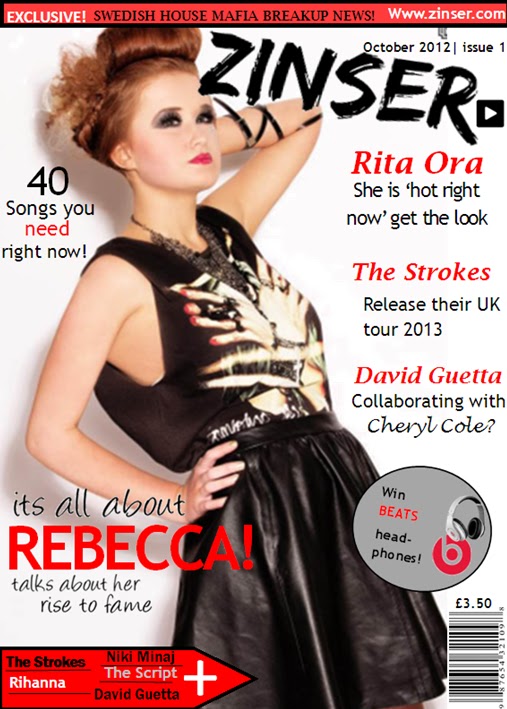
This is my final page design, i have changed a few things since my first attempt as i have changed some of the fonts as i thought it looked better having all of the text the same font and style as i didnt think it looked very good or appealing when all of the fonts where different. I have also changed the wording in some of the text from the first design as i think the phrases in the new design are more interesting than the other as i am using real celebrities rather than making up my own. I have also deleted the quotation that was in the bottom right hand corner as i didnt think it worked well on the page and it was also not clear enough to know who had said the quote as it was not next to the text about rebecca. The text of 'its all about' and 'talks about her rise to fame' have been changed as on my first design i used just normal Microsoft word fonts and i didnt think they attracted any attention as they were plain and boring, however i went onto the internet on a website called www.dafont.com and found some fonts that were more suitable and appealing for the front of the magazine and audience.
I had also changed the wording that was in the bar at the top of the page as i thought i should put something that would interest the readers rather than the date and price of the magazine. I think it now looks more appropriate for the magazine as it will interest the readers more now that there is something that will draw them in.
In my final design i decided to change the position of my price and barcode, i didnt think it worked well where it was so i decided to move it to the bottom right hand corner because alot of magazines use there barcodes in that position. I moved the price to underneath the barcode as i think that is the most suitable place to have the price as it a noticeable place for the price to be and also with the price being next to the barcode it relates to each other so it is better for the audience and the seller. I also changed the price of my magazine because i thought that £1.50 was too cheap for a magazine, so i decided to change it to £3.50. I moved the date and issue number above my Masthead as i think it is a good position to have it as when people are reading the masthead they will look just above and see the date of the magazine.
I havent changed the masthead position or my plug because i think they are in the right place and i think they look effective and appealing and will attract readers attention to buy the magazine. I like the plug i have put on my front page as it will draw attention from the readers that there is something on offer so it will have more popularity.
I have chosen the colour scheme to be red, black, grey and white as all of the colours work well together as they stand out from each other and give an impact of the page.The colours are also very clear to read. I have used the colour scheme all throughout the magazine because i thought replicating the scheme would brand the colours of the magazine and the readers will remember the colours of the magazine. I have put the made up website on the top on the page to make the magazine look more real.

Wednesday, 12 December 2012


For my double page spread i choose a large image to be on the left hand side of the page as it would attract the readers attention. The subject on the image is looking away from the camera which makes it a good image to use for the contents page as it could give the effect that the subject is looking towards the interview. This invites the audience to look at the article, the sub image looks directly to the audience which once the audience has been invited to read the article it makes them feel involved when they see the sub image.
The image that i had taken was taken as a close up shot because i thought that it would look more appealing on the double page because it is just a simple image and alot of text about the subject. The sub image was taken as a close up shot because it shows the emotion of the subject and also gives direct eye contact so that it makes the readers feel more involved with the article.
The text i have used on the page is Albertus Medium i chose to use this text for my writing because i think it gives of a profesional look and is a text that is easy readable by anyone. I chose to make the sub headings of each interview a different colour this was so the audience would know that the text in red was coming from a different person and the black writing was from the subject on the double page. The representations of the double page is a teenage girl and it shows the girl in a positive light trying to succeed in the music industry. The design of the double page is having one large image on one side and the text on the other which means that you could focus on the image on one side and then focus on the writing on the other rather than looking everywhere at the text.

The software i used to create this double page was microsoft word, i chose to use this software because i think that it gives a professional look and also has alot of tools that helps you create a realistic and creative looking double page. The tools that i used when designing my double page were the shape tools which let me create the arrow in the top right corner, i used this because i thought that it looked effective and like a real double page. I also used the text box tool which let me write all the text in the same size and align, it also let me chose the colour i wanted to have the text and if i wanted have some of the text bold which give it the finishing look.

I chose to have the colour of my text black and red because the house style and colour theme of my magazine were black and red. These colours are also very easy to read and see from a distance. Which makes it more apropraite and practical to chose these colours. The headline was created on the website dafont.com which lets you choose from hundreds of styles to suit your design. I chose this design because i thought that it would stand of the page and give a professional look to the double page.

contents review


 When designing my contents page i researched some real contents pages that is out in the market now and took some ideas to make mine look realistic. The house colour for my contents is black, red, white and grey i chose these colours as it would match the colour scheme on the front page as i wanted the colours replicate it throughout my magazine. I also think the colours work well together and are all clear and could read the information from a distance. The text i used on the contents page varied as i didnt want to keep to the same text as i thought it would be more appealing if they were all a bit different. The subheadings of the information i put in bold so that it would attract the audience attention towards the writing and then the information just normal text. I have chosen to put my headline in big text as it lets the audience know that it is the contents page and its stands off the page. I have placed the text 'october 2012' on top of the contents text as it looks like the text is resting on top of the word.The images i have chosen for my contents page are one large image of the subject of my double page feature , i have made this image the largest on the page as the magazine is based around her on this addition so the image works well on the page. The subject is also looking towards the camera which will make the audience feel involved in the magazine. I have also chosen images of the wanted but made them smaller in the bottom right hand corner, i made them smaller than the other image as it gives the impression that there is going to be a long feature of them as there are two images of them. The design of my contents page is appealing i think it is a good layout as the information goes down the left hand side of the page which focus's all your attention down the side of the page instead of information being spread all out the page. I think the layout of the large image is good as it breaks up the page and makes you focus on one thing each time rather than all over the page.

The software that i used to create my contents page was microsoft word i used this because it has all the tools on that i need to create my contents page. The software is also very easy to work with which would make it easier to work with the contents page. With microsoft word you can use a shape tool which let me create a box so that i could place it over the subheadings which would make it look more professional. The colour was too solid so i used the tool that would format the shape so that i could make the box colour more transparent to make it look effective. Also i used the text box tool so that i could add my text on the contents page. I used the bold tool to make some of the text stand out such as the subheadings so that they would look more effective and draw the readers attention towards what the subheadings are saying.

The colours and text style i have used on my contents page are similar to the front page as i wanted to keep the same colour scheme throughout my magazine. The red black and grey work well together and are colours that can be easily seen and read. The colours that i have chosen on my colour scheme were black, red and grey. I chose these because of the representations these colours give, the red connotes love and feelings however the black represents danger, which could give the effect to the audience that the subject is a loveable person but could be dangerous if you get in her way of what she wants to atchieve. Ive made the headline the biggest text so that it is the most noticable so that it will draw the readers attention towards the page. The text down the side of the page is in black so that the readers can focus directly to it but i have also divided the text up by putting the important parts in bold so it will draw the attention from the readers. I also used the website dafont to create the text 'lauren' in the editoral section as it looks that i have wrote it and gives a realistic look. 

The improvements that i have made to my contents page are i have made the main image alot smaller because it was too large and took up alot of room where more information could have been added. I didnt really like the sub images i had on my first draft of the wanted so i decided to change the image to my friends that i took when they got to meet twenty twenty as i could add more text about this photo and make it more realistic than the other images. I added a zinser winner section where i could add information and a image of a competition winner which makes my contents page look more professional and practical. I have also added an editoral because in some of the contents pages i anaylised it had an editoral section which i think looks engaging to the audience because they can get to read a little paragraph of what the editor of the magazine has wrote.

Thursday, 22 November 2012

preparation of magazine.


When preparing for my magazine I had to decide on a name for my magazine. I chose the name ‘Zinser’ as the name because I thought it was the name was quite catchy and quirky to use. The name Zinser is a very popular word but I think that it appeals to the magazine very well as I think it is a good name for a magazine as there aren’t a lot of magazines begin with the letter Z and also it isn’t easily forgotten. The price that I have chosen my magazine to be is £3.50 as I think that is a very reasonable price for a magazine and affordable as you find out the best gossip and music details within the magazine as well as it giving away free items in nearly every addition. There are also a lot of offers that could win you great prizes, so it is worth the price you pay for the magazine. Some magazines in the shops range from 2 pound and upwards without any free items so I think that the price I have chosen is a good price for my magazine. The representations of my magazine is teenage girls as the images on my magazine is of an teenage girl, it shows the girls in a positive light and how they have succeeded in the music industry. Unlike the media, as they are mostly stereotyped of being bad youth and connoted as not being as successful in now a day life. The images that I have put on my magazine are of a teenage girl, the front page image gives of a powerful effect as it portrays the subject as being a powerful person from the pose she is doing and also the shot type is a medium shot which gets most of her body in as you can see her body language and the clothing. The double page image is a close up shot and can only see the subjects face however she is looking to the side so it looks like she is looking towards the interview she is giving. The contents page image is also a close up shot but the subject is looking directly at the camera so it makes the audience feel involved. The audience of my magazine would probably be teenagers as I think teenagers are very involved in music gossip and like to know a lot about what is new like up coming chart music and what is out now in the top 40. The gender of my magazine would most likely be females as it shows a lot of images of females so this could make the females feel more involved with the magazine rather than males which would make them the primary audience. The males would be the secondary audience, as they might like the artist who is the main feature that week and could like the images. They could also like to read about the music gossip as the music information inside can be unisex so it would attract both genders. The age the magazine is aimed at is 13-21. 

Friday, 16 November 2012

editing of image

For my contents page image i edited it on microsoft word and also windows photo gallery, i done this to make the image stand out more on my contents page. when i was using windows photo gallery i changed the contrast and brightness on it as it gave me a more proffessional look and effect towards the image. I only brightened the image up a little on the scale because i didnt want the image to be too bright, i also only moved the contast scale a little aswell as i was going to add another effect on microsoft word. When editing my photo on microsoft word i double clicked on the image so that the colour icon would appear, i then chose the effect 'colour tone' which gave the image a bit more colour to it. I liked the image after finishing using the effects and now the second image is my final image for my contents page.

annotation of contents page 3

first design of double page


This is my first design of my double page, to create this the software i have used is microsoft word.

When making my double page i used microsoft word, i chose this program because it is a easy software to use and it also lets you create a professional design in a simple way. I like the tools on word because it lets you move and resize your images and text around with ease. I also used the shape tool to create the arrow at the top so that i could add text 'zinser cover' to make the double page look realistic and proficient. I used the tool formating shape so that i could change the colour of the box to solid fill to no fill. The text tool is good to create a worthy design to make the double page look good. It lets you change the colour of your text and also what align you would want your text to be in. The bold tool makes the text you choose to stand out from the rest of the text. To move my image to the left hand side of the page i used a tool called wrap text, then i clicked on square so that i could move the image around without it wraping around the text. I also used the software adobe photoshop to edit my image. I used the cutting tool so that i could cut around the image so that it didnt have the background on my double page.

I chose this image to be on my double page because i think that it creates a possitive representation of the subject because she is posing but it gives of the impression that they are serious about her new career. The shot that i have used for this image is a close up shot because it captures the subjects emotion in the image which could give of representations that she is passionate about doing well and that nothing is going to stop her atchieving her goals. I also took the subjects photo on the side so that when i uploaded it to my double page it would look like the subject was facing the interview.

The colours i have used in my double page are the same colour scheme throughout my magazine. I have divided the colours up in my text so that the sub headings are in red and the text is black. I thought that this made the page look more professional becaause it lets the readers know where to look first and breaks down all the text to look at. The headline is also black because i think that it gives impact and draws your attention straight towards it.

To improve my double page i am going to make it more appealing because i dont think that it has alot of features on the page that makes it look like a real double page feature. I am going to add the page number at the bottom of the left hand page so that it gives the effect of realism. I am also going to add a quote in the text because i think that every good double page feature has a quote so i am going to add one where there is space.

first design contents page


This is my first design of my contents page, i created this design on microsoft word.

When making my contents page i used the software microsoft word because it is a software that is easy to use and can create my contents page in a professional way. In word it is easy to resize and move your images and text. You can also wrap text around your images to make it easier for you to move your images around the text or next to the text. With word i can also use the text box to create my text for the contents page and also decide wich align i would want to choose for my text to be in. I also made some of my text bold and italic so that it would give it more of a professional look to the text. The text on my contents page is very clear to read as the style of the font i have used is easily readable and also it is positioned in places where it is clear to read for an example the subheadings are in bold and the text underneath is just normal. Another tool that i used in word was the shape tool which helped me to create the rectangular boxes over the headings of each text. With these shaped i could change the colours of them by formating the shape which let me also make the box transparent. I made the boxes transparent so that the boxes werent bright grey and could also see the text that was underneath it.

I have chosen these images to go on my contents page because i think that the main image of the subject is striking and also eye catching. This image is also a positive representation as she looks important and successful and shows that she is just a down to earth person. The primary audience for my magazine are teenagers (13-25) who may see the girl in the image to be inspiring and a role model.The subject in the image is looking directly towards the audience which could make the readers feel more involved with the subject. When i took this image i decided that i was going to do a close up shot because i thought that it would show the emotion and happiness of the girl with the success in her career and show her of in a possitive light. The sub images are what i took at the wanted concert which are taken from a long shot to show all of the members in the group, it could show representations that the group are strong and connected.

The colours that are used in the contents page are the same colours from my front page because i wanted to stick to a certain colour scheme because i think that the colours will represent the zinser magazine and will be appealing. Also i think that all the colours work well together and have a strong impact on the page because of the colour choice. Im going to replicate the colour scheme throughout the whole magazine. I also think that the colours red and black have strong connotations, the colour red could be seen as the colour of love and the black could represent danger which could overall mean that she is a loveable person but could also be dangerous in getting what she wanted to atchieve.

To improve my contents page i think that im going to resize the main image smaller because i think that it is too large and could add more pieces of information in place of the large image. I am going to add a editoral on the page because i think it makes the page look more professional.


Thursday, 15 November 2012

3 original images

These are my 3 main images that i have used for my front page, contents page and double page spread. I have chosen these images because i think each one of them are very appealing and attractive which would draw the reader attention towards each of the pages i am using them for. The third image is used on my front page, i have chosen that image to be on the front because i think it is a really good image and it is a good medium shot that shows most of the subject so it will be be a good shot to have on the front as it will draw the reader attention, it also shows on the clothing the image is wearing so it could give fashion inspiration for the readers.
The first image i have chosen for my contents page because the subject it looking directly towards the camera which makes the audience feel involved with the person. It is also a clear and appealing photo so it will hopefully stand out against the contents page. The image is also a close up shot which shows the subject very close to her face, this could give makeup ideas to the readers.
 The second photo i have chosen to use this image on the double page spread because the subject is looking towards the text on the double page which gives the effect that the subject is looking at the interview that she has given. This is a good effect because it makes the readers feel that she is also interested in her story as well as everyone else. The image is a close up shot which shows her face very closely but in a different way as she is looking to the side to look towards the text.

Wednesday, 14 November 2012

flat plan of double page spread


This is the flat plan of my double page spread, i have chose to design the page like this because i think it will look effective when it is finished by using a large image on one section of the page and then filling the other section with text from the music artist.

flat plan of contents page


This is the flat plan of what i would like my contents page to look like,  i have took some ideas from other contents pages and put it all together on my flat plan to make it hopefully look like my real contents page.

flat plan of front page

This is the flat plan of what i would like my front page of my magazine to look like when i have completed it, i have designed the flat plan the way i think it would look good for when i have eventually finished. I have annotated the flat plan so that i remember what specific ideas i would like to put on the front page.

annotation double page 3


Friday, 9 November 2012

first design of magazine front


To create my front cover the software i used was microsoft publisher, this software allows you to design and create banners, certificates, flyers and alot more. There are alot of tools that i used on publisher to give my front page a professional look.I used the picture tool where you could wrap the text which meant that i could move the image round to where ever i needed to on the page with ease. I also used the recolour tool which i could click on to change my image to transparent that made the background clear so that i could have just my image on the white background. The plug on my front page was created by the shape tool where i could make a circle shape, i could change the colour of the shape by formatting it so i could have it the colour to match my colour scheme. If i needed to change the shape the tools on publisher make it much easier to use as you can resize and move it about.

For my front page i have chosen to use the colours black red and grey because i think that these colours work well together and give of a strong connoation as the red and black colour represent the colours of danger. I think that it also portrays the subject in the image to being powerful and dangerous aswell. I want to keep these colours throughout my magazine and have these colours as my house style. The text that i have used on my front page are quite big and bold so that it grabs the readers attention to my front page. Ive used the masthead in a big font and also the text 'rebecca' because i think that these are important text for the front page. The text 'rebecca' indicates that the main feature is going to be about someone called rebecca. Also with the text on the page i have used the text that i want to stand out in a different colour to the other text because i think that it will draw the readers attention towards the text.

For the main image on the front page i tried to give a representation of a powerful and strong girl by the pose that the subject is doing. It shows that they are serious about the whole music career and gives of representations that she will be successful from the passion she has for her music career. The image is also looking up towards the masthead which gives an effect that she is looking up to her music career. The image is also of a young attractive female that will draw the secondry audiences attention who are male, the image may make the audience buy the magazine and read on. The primary audience may be inspired by the subject as a strong women. The image for my front page is eye catching and very appealing as it is a strong and influential image that would capture the readers attention towards the magazine to buy it. I took this image in a room with white walls so that it would look like the subject was in an actual photo studio and so i could edit the image to make the background white. I took a medium shot of the subject because i think that it was the perfect shot to use because you can see the detail of the subjects makeup, hair and clothing which could inspire some girls of the same fashion.

To improve my front page i am going to change some of the text fonts so that i have a variety of different fonts, im also going to resize some of the fonts to make them bigger to fill in more of the front page. Im also going to add more text in the headline box at the top of the page. I dont think that im going to keep the quote on the front page because i dont think that it is very appealing and would look better without it.

annotation of contents page 2